All tests are run on 64bit Windows 10, with Java 19. As 64bit is popular now, this book assumes all code are running on 64bit JVM
Jimds String #
For Redis string, if it’s encoded as a number, 16 extra bytes are needed, that means to save a 8 bytes value. if it’s encoded as raw or embstr, 20 to 34 extra bytes are needed, depends on string length.
With Java, it’s hard to control memory management like C, as JVM manages automatically. We will see what we can do to improve space efficiency.
Java Object Layout #
For each Java object in memory, there are always two headers:
- mark word: 8 bytes(for 64bit JVM)
- class pointer: 8 bytes(if UseCompressedClassPointer is false)/4 bytes(if UseCompressedClassPointer is true)
CompressedOops #
By default, if heap size is less than 32G, compressedOops is true, then each object reference uses 4 bytes.
-XX:-UseCompressedOops is used to disable it, then each object reference is 8 bytes.
First let’s take a look at current main objects’ memory usage. JOL is a tool provided by OpenJDK to print java object layout.
The following method uses JOL to show some objects’ memory usage.
public class MemoryLayout {
    public static void main(String[] args) {
        System.out.println(VM.current().details());
        System.out.println(ClassLayout.parseClass(JimdsObject.class).toPrintable());
        System.out.println(ClassLayout.parseClass(SimpleString.class).toPrintable());
        System.out.println(ClassLayout.parseInstance(ByteWord.create(1L)).toPrintable());
        System.out.println(ClassLayout.parseInstance(ByteWord.create(new byte[]{'a', 'b', 'c'})).toPrintable());
        System.out.println(ClassLayout.parseInstance(ByteWord.create(List.of(new byte[]{'a','b','c'}, new byte[]{'a','b','c'}, new byte[]{'a','b','c'}))).toPrintable());
    }
}
Memory usage #
The first line System.out.println(VM.current().details()); generates the following output:
# Running 64-bit HotSpot VM.
# Using compressed oop with 3-bit shift.
# Using compressed klass with 3-bit shift.
# WARNING | Compressed references base/shifts are guessed by the experiment!
# WARNING | Therefore, computed addresses are just guesses, and ARE NOT RELIABLE.
# WARNING | Make sure to attach Serviceability Agent to get the reliable addresses.
# Objects are 8 bytes aligned.
# Field sizes by type: 4, 1, 1, 2, 2, 4, 4, 8, 8 [bytes]
# Array element sizes: 4, 1, 1, 2, 2, 4, 4, 8, 8 [bytes]
# Running 64-bit HotSpot VM.
# Using compressed klass with 3-bit shift.
# WARNING | Compressed references base/shifts are guessed by the experiment!
# WARNING | Therefore, computed addresses are just guesses, and ARE NOT RELIABLE.
# WARNING | Make sure to attach Serviceability Agent to get the reliable addresses.
# Objects are 8 bytes aligned.
# Field sizes by type: 8, 1, 1, 2, 2, 4, 4, 8, 8 [bytes]
# Array element sizes: 8, 1, 1, 2, 2, 4, 4, 8, 8 [bytes]
Note that Objects are 8 bytes aligned, so except space taken by each field, JVM may also add exta space(padding space) for alignment.
In SimpleDatabase, to save a string type value, the structure is:
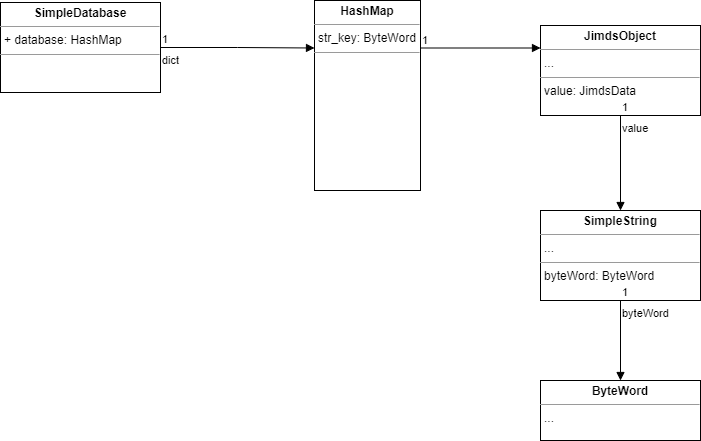
It takes at least 24+24+16=64 extra bytes For No compressed oops, and 16+16+12=44 extra bytes for compressed oops. it’s much larger than Redis.
And if a ByteWord contains multiple byte arrays, it’s even worse.
As ByteWord is heavily used, a method compact was added, it’s used to convert a list of byte array into a single byte array.
In class ByteWord.MultiBytesWord
        @Override
        public ByteWord compact() {
            byte[] bytes = new byte[size()];
            int index = 0;
            for (byte[] b: word) {
                System.arraycopy(b, 0, bytes, index, b.length);
                index += b.length;
            }
            return new SingleByteWord(bytes);
        }
Another improvement is getting rid of JimdsObject, unlike C, each Java Object is an instance of a Class, so data type is already known from Class.